Customers can categorize, (wedding, birthday, anniversary, etc.), name, locate, and put a deadline on their gift registries. This makes it clear what your registry is for and when it closes/ends. Personalizing your registry information also makes it easy for friends, family members, etc. to search for your gift registry and find it.
Manage Your Registry
Arguably the most compelling feature of the Blain’s gift registry is the fact that every user can manage the registry and communicate with one another. Whoever creates the registry can add or remove products as they please, prioritize which products they are most interested in, and attach a note to each product they add. This makes it very easy and efficient to communicate with everyone in your registry. Similarly, friends, family members, and whoever received a link to the gift registry also can communicate with one another. Each time someone buys a gift from the registry, it is marked as “purchased.” This makes it clear what gifts have already been bought to prevent duplication.
The integration of the gift registry in the mobile app makes it simple to manage your gift registry on-the-go. If you come across an item that piques your interest simply pull up your gift registry on our mobile app and add it to your list! The days of creating a handwritten list that’s easy to lose or misplace are over. Stay organized and save time by housing your gift registry in our mobile app to make life easier for everyone.
How to Create a Registry on Your Mobile Phone
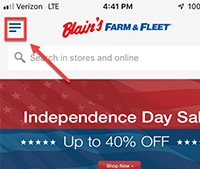
1. Open the Blain’s App
First, make sure you have the Blain’s Farm & Fleet app downloaded onto your IOS or Android device. Once installed, open the app or click on the ribbon in the top left corner of your screen.
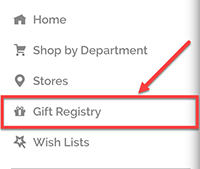
2. Select the “Gift Registry” Menu Option
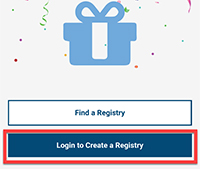
3. Click “Login to Create a Registry”
(If logged in to your Blain’s Farm & Fleet account, skip steps 3 & 4.)
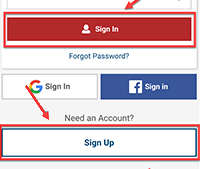
4. Enter Your Blain’s Farm & Fleet Account Credentials
Click “Sign In,” or select “Sign Up Now” if you don’t have a Blain’s Farm & Fleet account.
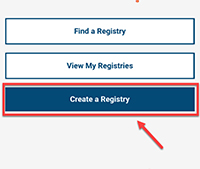
5. Click “Create a Registry”
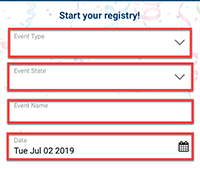
6. Start Your Registry!
Fill in all the information about your event for the gift registry (Event Type, Event State, Event Name, and Event Date).
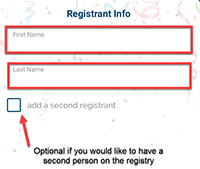
7. Add Registrant Information
Enter in your First and Last Name, and add as many other registrants as necessary. It’s important to complete this step, so everyone knows who created the gift registry.
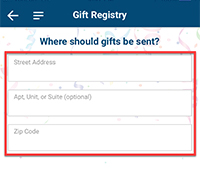
8. Add Your Shipping Address
Enter in your street address, apartment unit or suite (if necessary), and zip code.
9. Add items to the Registry, and Share Your Registry
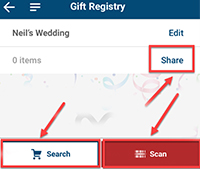
Scan: If you are in one of our stores and find a product that you would like to add to your registry, simply scan the barcode! There’s no need to waste your time looking up the product online if it’s right in front of you at the store.
Search: Shop for products by using the search bar, or select “Shop by Department” and sort through each of our product categories. Once you find a product you like, select the “Add to Registry” option that appears when you are on the product page.
Share: Share your registry with friends and family at the click of a button. Simply select the “Share” option in the top right corner of your screen.
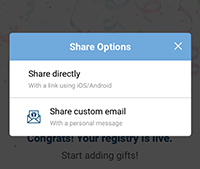
10. Multiple Ways to Share Your Gift Registry
In order to share your registry, you must be on the “Gift Registry” homepage. Once here, you’ll notice a “Share” option at the top of your screen (right below the name of your registry).
Select “Share,” and then decide whether you’re sending the registry via email, or if you’re sharing a link to the registry via a different mode of communication (Facebook Messenger, text message, etc.).